
Tuffpuff casino registration takes about a minute: click Sign up (or use the Quick start form on the homepage), choose Join with Google or enter an email and password, tick the 18+ and terms box and press Join & Play. A promo code can be added through the "Have a promo code?" link under the form. After registration, the first deposit unlocks the welcome pack, where you choose between Standard (up to AUD 1,135 + 250 free spins) and High-Roller (up to AUD 4,375 + 300 free spins). Australian players can use the English-AU site version and play in AUD.
This page explains both sign-up methods, what to do right after creating the account, how to choose the welcome route and how to prepare for verification so the first withdrawal is not delayed.
| Registration essentials | Details |
|---|---|
| Where to sign up | Sign up button, Quick start form on the homepage |
| Methods | Google account, or email + password |
| Required fields | Email and password (or Google) |
| Age requirement | 18+, confirmed with a checkbox |
| Promo code | "Have a promo code?" link under the form |
| Currency | AUD |
| Welcome pack | Standard or High-Roller, chosen at first deposit |
| First reward | First Move achievement, +1 coin |
| Verification | Usually before the first withdrawal |
The registration form is the same on desktop, mobile browser and app, and an account created on one device works on all of them.
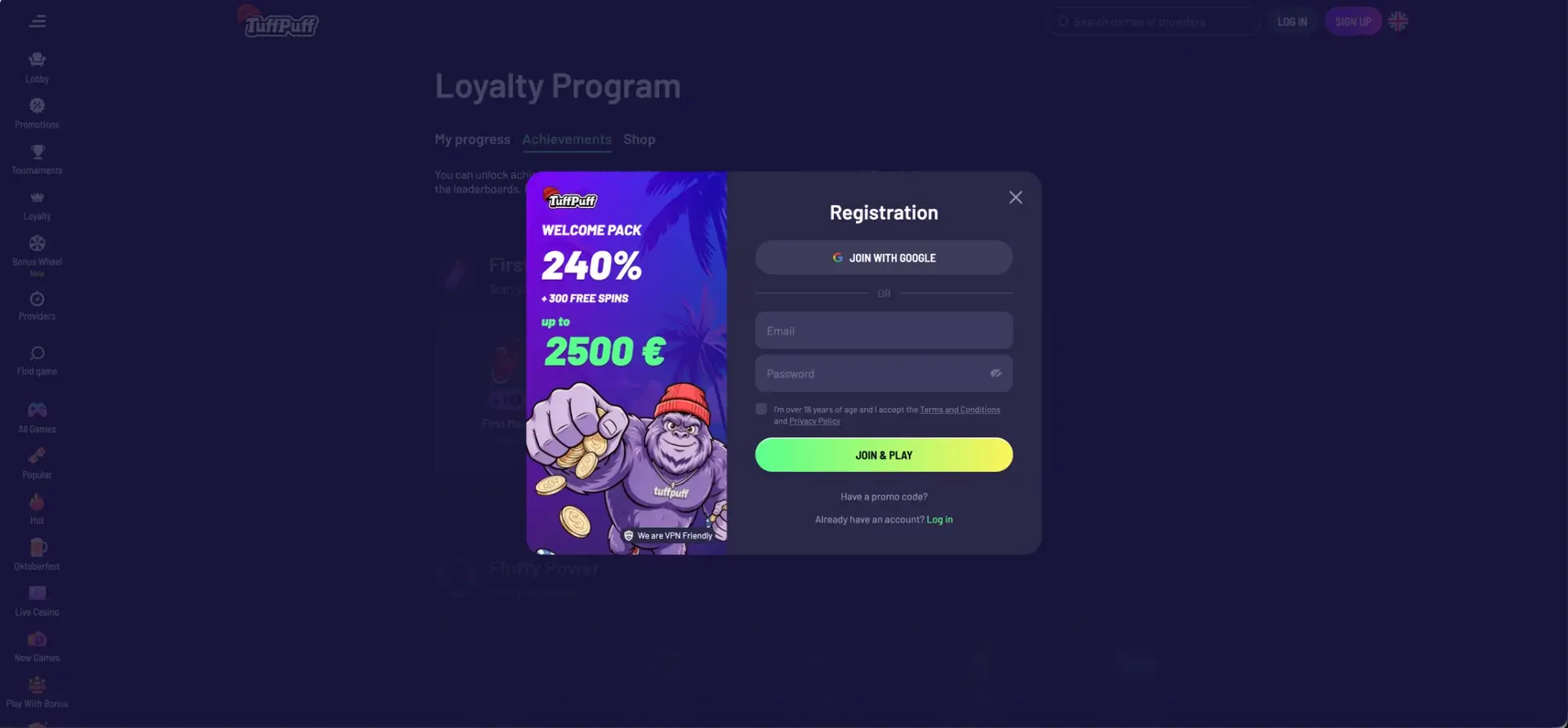
How to register at Tuffpuff casino
There are two entry points to the form: the Registration window that opens from the Sign up button, and the Quick start panel next to the welcome banner on the homepage. Both create the same type of account.
Registration with email
This route creates an account with its own password:
- Click Sign up in the top-right corner of the site.
- Enter your email address.
- Create a password; the eye icon lets you check it before submitting.
- Tick the box confirming you are over 18 and accept the Terms and Conditions and Privacy Policy.
- If you have a promo code, click Have a promo code? and enter it.
- Press Join & Play.
Use an email address you check regularly, as password resets and account messages go there.
Registration with Google
The Google route is faster and needs no separate password:
- Click Sign up or the "Sign up with" Google icon in the Quick start panel.
- Press Join with Google.
- Choose your Google account and confirm access.
- Accept the age and terms confirmation if prompted.
Accounts created this way always log in through Sign in with Google. Trying the email-and-password form with such an account will not work, which is a common source of confusion later.
Email or Google: which to choose
Both methods give the same account, bonuses and limits. The difference lies in how the account is accessed and protected.
| Parameter | Email + password | |
|---|---|---|
| Speed | About a minute | A few seconds |
| Password to remember | Yes | No |
| Protection | Casino password + email security | Google security, including two-step verification |
| Login | Username or email + password | Sign in with Google |
| If access is lost | Forgot your password? link | Restore the Google account |
Google is convenient on a personal phone where the account is already signed in. Email registration suits players who prefer to keep casino access separate from their main Google account.
Promo code at registration
The "Have a promo code?" link under the registration form opens a field for a code. Promo codes are not required for the welcome pack, which is available to every new account through the first deposit. Codes are used for special campaigns, and Tuffpuff publishes exclusive offers in its Telegram channel.
A code should be entered before pressing Join & Play, as it may not be possible to add it to an existing account later.
What to do after registration
A few steps right after creating the account make the rest of the process smoother:
- Select the English-AU language version and check that the account currency is AUD.
- Fill in the profile with your real name, date of birth and address, exactly as in your documents.
- Upload verification documents in advance.
- Open Loyalty > Achievements: the first login has already completed First Move (+1 coin).
- Read the Bonus Terms for the welcome route you plan to use.
- Decide on a budget and the first deposit amount.
Profile details must match the documents and payment methods, since mismatches are the most frequent reason for withdrawal delays.
Choosing the welcome route at the first deposit
The welcome pack starts with the first deposit, and this is where the route is fixed for all three stages.
| Route | 1st deposit | 2nd deposit | 3rd deposit | Total |
|---|---|---|---|---|
| Standard | 100% up to AUD 260 + 50 FS | 80% up to AUD 350 + 75 FS | 60% up to AUD 525 + 125 FS | AUD 1,135 + 250 FS |
| High-Roller | 50% up to AUD 3,500 + 100 FS | 80% up to AUD 350 + 75 FS | 60% up to AUD 525 + 125 FS | AUD 4,375 + 300 FS |
For a first deposit under AUD 520, Standard gives more bonus cash. From AUD 520, High-Roller gives the same or more cash and twice the first-stage free spins. A first deposit of about AUD 35 or more also completes the First Cash achievement for 3 coins.
Verification after registration
Registration itself does not require documents, but Tuffpuff casino operates under a Curaçao licence and checks identity before withdrawals. The standard set includes:
- Photo ID: passport or Australian driver licence.
- Proof of address: a recent utility bill or bank statement.
- Proof of payment method ownership.
Uploading documents early means the first cashout can be processed without waiting for checks.
Registration rules
The casino's terms set a few basic rules for new accounts:
- Only players aged 18 and over can register.
- One account per person; duplicate accounts can be closed and bonuses cancelled.
- Personal data must be accurate and match identity documents.
- Payment methods must belong to the account holder.
Online casino services are not licensed locally under Australia's Interactive Gambling Act 2001, so each player should check how local rules apply to them before signing up.
Common registration problems
Most sign-up issues have quick fixes:
- "Email already in use": an account already exists; use Log in or Forgot your password?
- Join & Play button inactive: the 18+ and terms box is not ticked.
- Google window closes: allow pop-ups for the site and try again.
- Form does not load: clear the browser cache or try another browser.
If the problem persists, live chat is available from the side menu even without an account.
FAQ about Tuffpuff casino registration
Common questions about signing up at Tuffpuff casino in Australia.
How do I register at Tuffpuff casino?
Click Sign up, choose Google or enter an email and password, confirm you are 18+ and press Join & Play.
Can I sign up at Tuffpuff with Google?
Yes. Join with Google creates the account in a few seconds without a separate password.
Do I need a promo code for the Tuffpuff casino welcome bonus?
No. The welcome pack is available to all new accounts through the first deposit.
Can Australian players register at Tuffpuff casino?
Yes. Tuffpuff accepts Australian players, supports AUD and has an English-AU site version.
Do I need documents to register?
No. Documents are usually requested before the first withdrawal.
When do I choose the welcome route?
At the first deposit, by selecting the Standard or High-Roller card on the promotions page.